Operate
Make a call
Using a cordless handset:
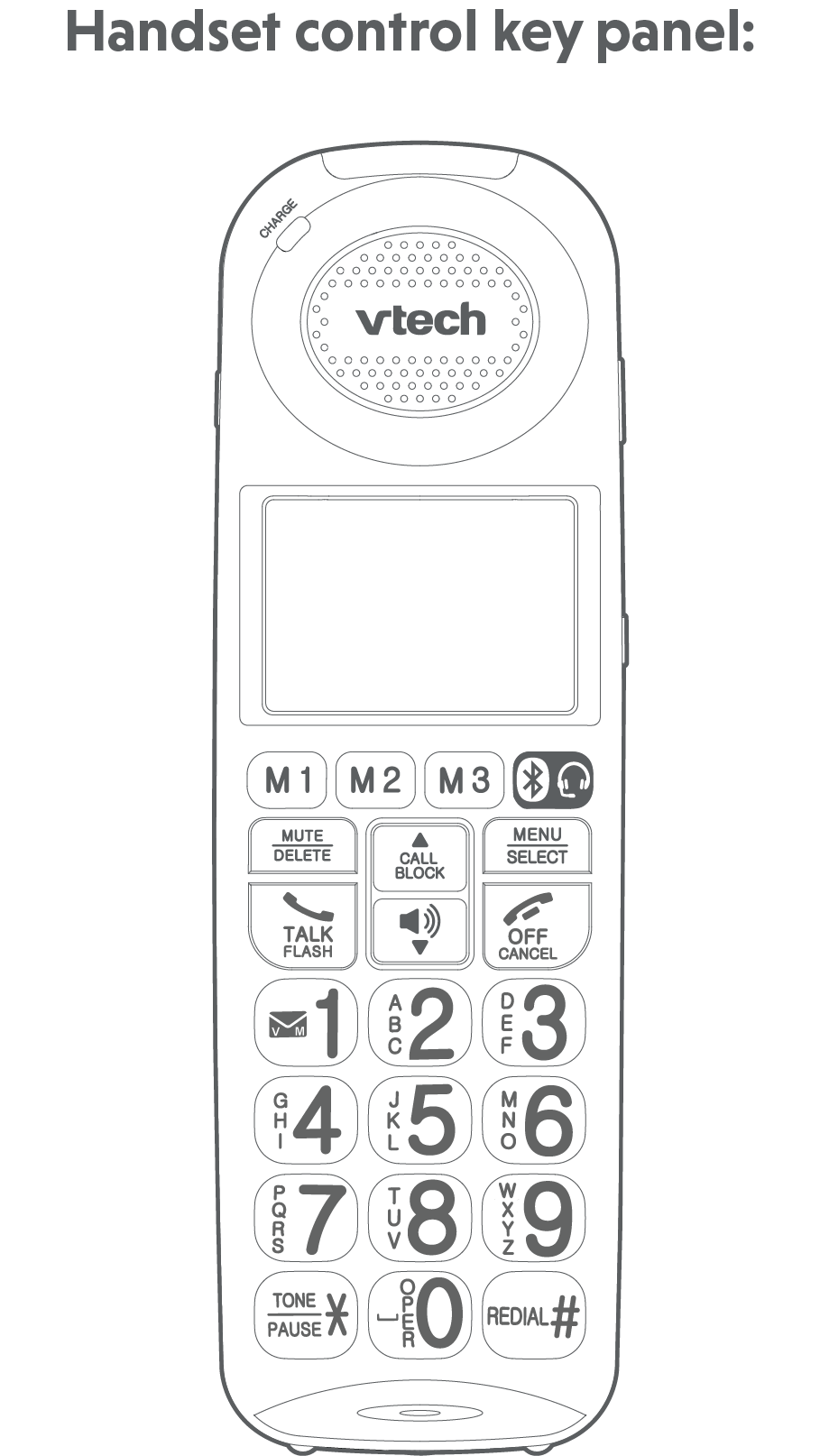
Press  TALK/FLASH or
  , and then dial the telephone number.
 NOTES
NOTES
The screen shows the elapsed time as you talk (in hours, minutes and seconds).
While entering numbers, press and hold TONE/PAUSE
 to insert a dialing pause (a P appears).
Predial a call
Using a cordless handset:
Enter the telephone number using the dialing keys (0-9), then press TALK/FLASH or to dial.
NOTE
When predialing (preview numbers before dialing), press MUTE/DELETE or
 OFF/CANCEL to backspace and delete; press and hold TONE/PAUSE to insert a dialing pause (a P appears).
Answer a call
Using a cordless handset:
Press TALK/FLASH, or any of the dialing keys.
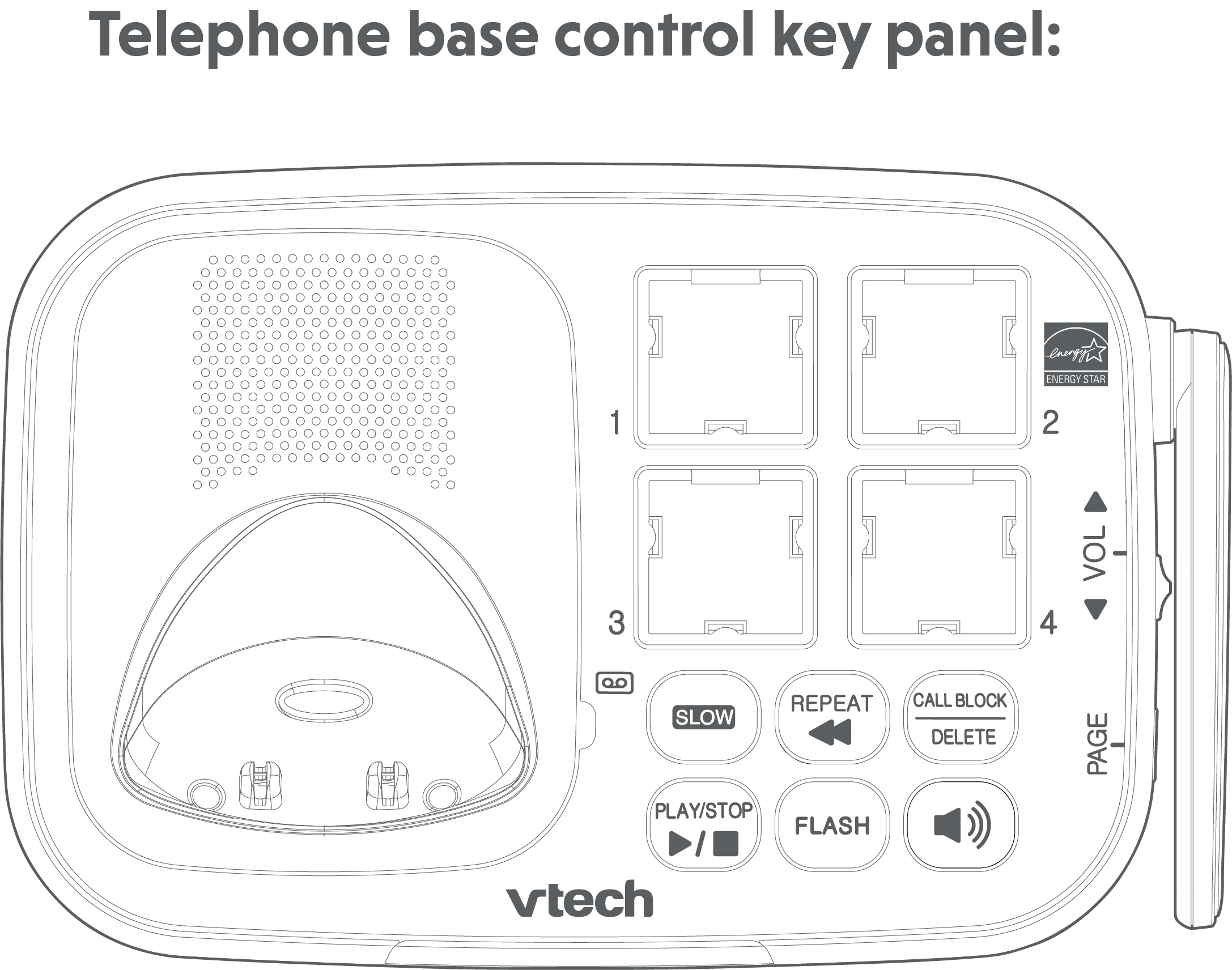
Using the telephone base:
Press .
End a call
Using a cordless handset:
Press OFF/CANCEL or put the cordless handset back in the charger.
Using the telephone base:
If you are using the telephone base speakerphone, press
on the telephone base to end the call.
Handset speakerphone
During a call, press to switch between speakerphone and normal handset use.
When the speakerphone is active, the cordless handset displays Speaker.
Volume
Telephone base ringer volume
Slide the volume control switch
 on the telephone base to adjust the speaker volume when on a call or adjust the ringer volume when the telephone is ringing.
Handset ringer volume
Slide the volume control switch
 on the cordless handset to adjust the speaker volume when on a call or adjust the ringer volume when the telephone is ringing.
 CAUTION

For hearing protection, do not put the cordless handset near your ear when the telephone is ringing. Loud ringer sound may damage your hearing. Adjust the volume to lower the ringer sound if you find it too loud.
Temporary ringer silencing
When the telephone is ringing, you can temporarily silence the ringer without disconnecting the call. The next call rings normally at the preset volume.
To silence the cordless handset ringer:
Press
OFF/CANCEL or MUTE/DELETE on the cordless handset. The handset displays  and Ringer muted.
Mute
The mute function allows you to hear the other party but the other party cannot hear you.
During a call, press MUTE. The handset displays Muted briefly and MUTE icon until the mute function is turned off.
Press MUTE again to resume the conversation. The handset displays Microphone ON briefly.
Join a call in progress
When you are already on an outside call with the cordless handset or the telephone base, the handset or the telephone base can join the call.
To join a call with a cordless handset:
When the telephone base is already on a call, press
TALK/FLASH or on the cordless handset to join the call.To exit the call, press
OFF/CANCEL on the handset or place it in the charging cradle.
To join a call with the telephone base:
Press
to join the call.To exit the call, press
on the telephone base.
Call waiting
When you subscribe to call waiting service from your telephone service provider, you hear an alert tone if there is an incoming call while you are already on a call.
Using the cordless handset:
Press
TALK/FLASH to put the current call on hold and take the new call.Press
TALK/FLASH at any time to switch back and forth between calls.
Using the telephone base:
Press FLASH to put the current call on hold and take the new call.
Press FLASH at any time to switch back and forth between calls.
If you also subscribe to caller ID service, it will let you see the name and telephone number of the caller during call waiting.
It may be necessary to change your telephone service to use this feature. Contact your telephone service provide if:
You have both caller ID and call waiting, but as separate service (you may need to combine these service);
You have only caller ID service, or only call waiting service; or
You do not subscribe to caller ID or call waiting services.
There are fees for caller ID services. In addition, services may not be available in all areas.
Equalizer
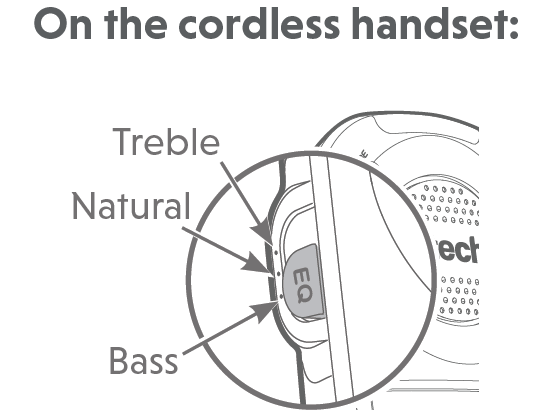
The equalizer on the cordless handset and telephone base enable you to change the quality of the audio for both handset earpiece and speakerphone to best suit your hearing. The default setting is Natural.
Slide the EQ button to toggle among Treble, Natural and Bass.
NOTES
If you switch the call between the handset and the speakerphone by pressing
, the audio setting remains unchanged.The current equalizer setting remains unchanged until a new setting is selected.
Audio Assist ®
The Audio Assist feature enhances the clarity and loudness of your caller’s voice on the cordless/corded handset earpiece when you are on a call, or listening to a message or an announcement.
To turn on or off Audio Assist on the cordless handset:
While you are on a call, or listening to a message or an announcement, using the handset earpiece, press AUDIO ASSIST/SOS on the handset. The handset briefly displays Audio assist on.
Press AUDIO ASSIST/SOS again to turn off. The handset briefly displays Audio assist off.
Temporary tone dialing
If you have pulse (rotary) service only, you can switch from pulse to touch-tone dialing temporarily during a call. This is useful if you need to send touch-tone signals to access your telephone banking or long distance services.
During a call, press TONE
.Use the dialing keys to enter the number. The telephone sends touch-tone signals. It automatically returns to pulse dialing mode after you end the call.
Chain dialing
Use this feature to initiate a dialing sequence from numbers stored in the phonebook, caller ID log or redial while you are on a call.
Chain dialing can be useful if you wish to access other numbers (such as bank account numbers or access codes) from the phonebook, caller ID log or redial list.
To access a number in the phonebook while on a call:
Press MENU/SELECT and then press
 or
or  to select Phonebook.
Press MENU/SELECT and then press
or to scroll to the desired entry.Press MENU/SELECT to dial the displayed number.
To access a number in the caller ID log while on a call:
Press MENU/SELECT and then press
or to select Caller ID log.Press MENU/SELECT and then press
or to scroll to the desired entry.Press MENU/SELECT to dial the displayed number.
To access a number in the redial list while on a call:
Press REDIAL
 .
.Press
or to browse to the desired entry.Press MENU/SELECT to dial the displayed number.
NOTES
You cannot edit a phonebook entry while on a call. Refer to the Phonebook section for more details.
You cannot copy a caller ID log entry into the phonebook while on a call. Refer to the Caller ID log section for more details.
You cannot erase a redial entry while on a call. Refer to the Redial list section for more details.
Press
OFF/CANCEL to exit redial, phonebook or caller ID log when you are on a call.